
Download your Facebook & Instagram information
You'll use Meta Accounts Center to request a download of your information, save the ZIP file to your device, and keep it ready for SynDiary. SynDiary never needs your Facebook or Instagram password.
Before you start
Section titled “Before you start”- Sign in to the Facebook or Instagram account you want to download from.
- Use Wi-Fi and make sure your device has enough free storage, since large accounts create large ZIP files.
- Choose Download to device, not Transfer to another service, when you need a file for SynDiary.
- Format: choose JSON for app imports. Choose HTML if you want a personal archive to read manually.
- Date range: choose All time for your complete history.
- Keep the ZIP private.
Where to find Accounts Center
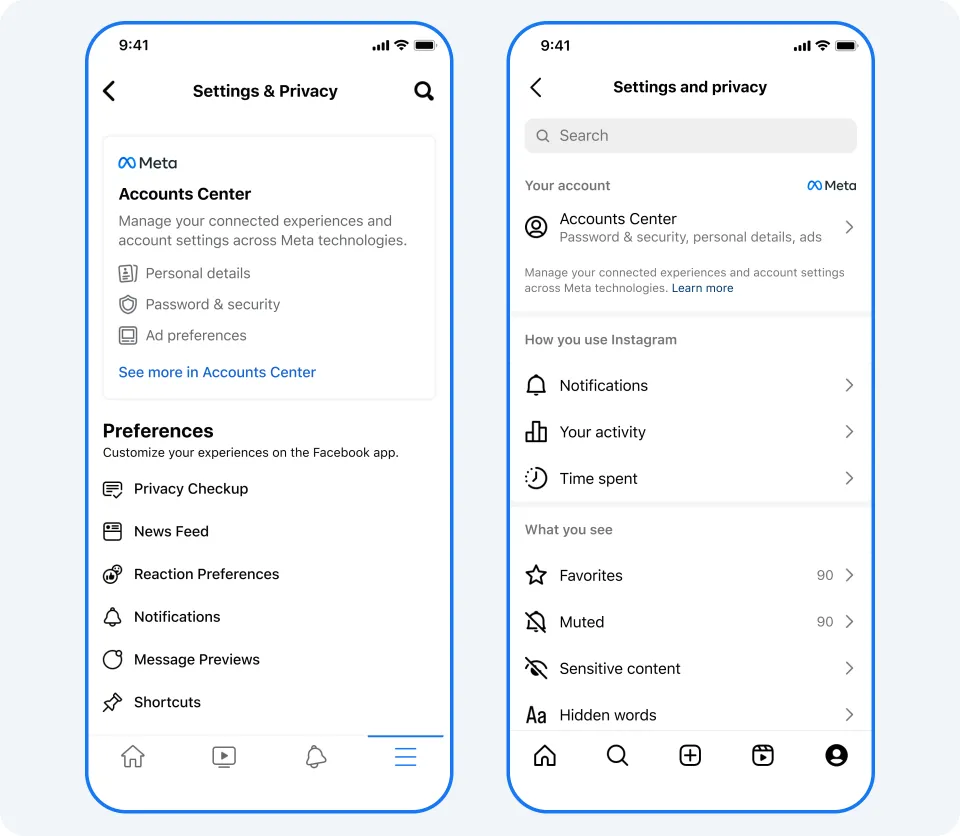
Section titled “Where to find Accounts Center”Accounts Center is the shared settings area for Facebook and Instagram. You can open it from either app.
| Where | Path |
|---|---|
| Facebook app | Menu → Settings & privacy → Settings → Accounts Center |
| Instagram app | Profile → menu (three lines) → Settings and privacy (or Settings and activity) → Accounts Center |
| Desktop browser | Open Meta Accounts Center → Your information and permissions → Download your information |
Option A: Download Facebook and Instagram together
Section titled “Option A: Download Facebook and Instagram together”Use this when your Facebook and Instagram profiles are connected in the same Accounts Center and you want one request that includes both.
-
Open Accounts Center. Open Facebook or Instagram and go to Accounts Center using the path above.
-
Open "Your information and permissions". Scroll to Account settings and select it, then choose Download your information.
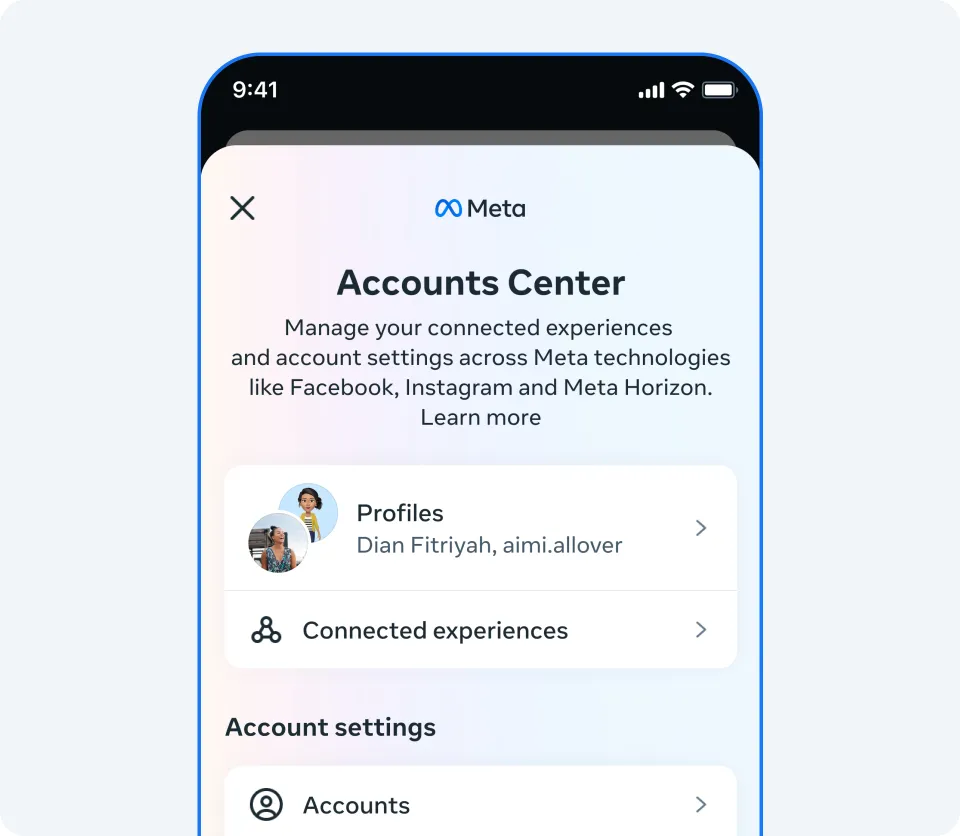
Accounts Center. "Your information and permissions" sits under Account settings, below what you see here. Source: Meta. -
Choose "Download or transfer information" on the next screen.
-
Select the accounts. Choose the Facebook and Instagram profiles to include, then tap Next.
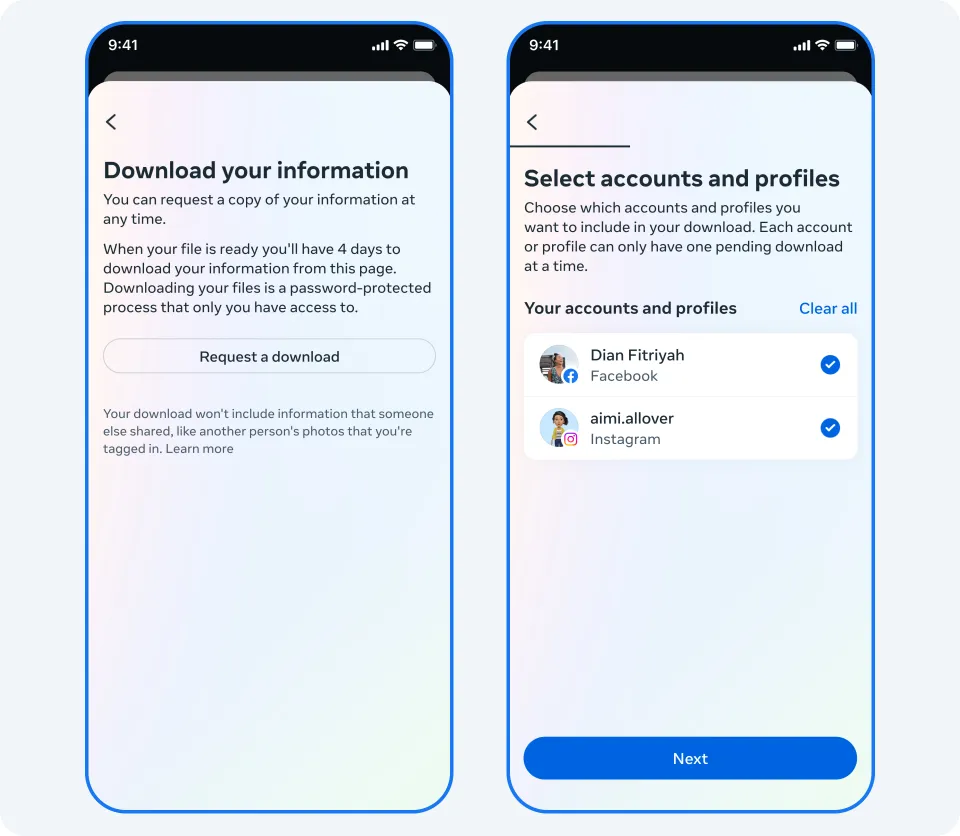
Requesting a download (left), then selecting the Facebook and Instagram profiles to include (right). Source: Meta. -
Choose the amount of information. Select All available information for a complete export.
-
Choose the destination. Select Download to device, then tap Next.
-
Set download options. For a full SynDiary import use Date range: All time and Format: JSON. (Larger media quality takes longer and creates a bigger file.)
-
Create the files. Tap Create files. Meta starts preparing your download.
-
Download the ZIP when it's ready. When Meta notifies you, return to Download your information and tap Download. Save the ZIP somewhere you can find it, such as Downloads or Files. (Meta may ask you to enter your password before the download starts, and prepared files stay available for a limited number of days.)
-
Keep the ZIP ready for SynDiary. Store the file somewhere safe. When the Facebook/Instagram import option is available in the app, you'll select this ZIP.
Option B: Download Facebook only
Section titled “Option B: Download Facebook only”- Open Facebook → Menu → Settings & privacy → Settings → Accounts Center.
- Go to Your information and permissions → Download your information → Download or transfer information.
- Select only your Facebook profile, then tap Next.
- Choose All available information (or specific categories if that's all you need).
- Choose Download to device.
- Use Date range: All time and Format: JSON for app import (HTML for a readable archive).
- Tap Create files, wait for the notification, then return and download the ZIP.
Option C: Download Instagram only
Section titled “Option C: Download Instagram only”- Open Instagram → Profile → menu (three lines) → Settings and privacy (or Settings and activity) → Accounts Center.
- Go to Your information and permissions → Download your information → Download or transfer information.
- Select only your Instagram profile, then tap Next.
- Choose All available information (or Some of your information for selected categories).
- Choose Download to device.
- Use Date range: All time and Format: JSON for app import (HTML for a readable archive).
- Tap Create files, wait for the notification, then return and download the ZIP.
Troubleshooting
Section titled “Troubleshooting”| Problem | What to try |
|---|---|
| I can't find Accounts Center. | Update Facebook or Instagram, then search Settings for "Accounts Center" or "Download your information." If both accounts are connected, try the other app. |
| My download is still pending. | Wait for Meta's notification or email. Large accounts take longer to prepare. |
| The download link expired. | Return to Download your information and request a new file. |
| The ZIP is too large for my phone. | Use a desktop browser, or free up storage before downloading. |
| I chose HTML but need JSON. | Request a new download and choose JSON as the format. |
| I only downloaded one account. | Create a new request and select the missing Facebook or Instagram profile. |
| I'm not sure the file is right for SynDiary. | Keep the original ZIP from Meta (don't unzip it). When in-app import is available, follow the prompts in SynDiary. They'll tell you exactly what to select. |
Short version
Section titled “Short version”Open Facebook or Instagram → Accounts Center → Your information and permissions → Download your information → Download or transfer information. Select Facebook, Instagram, or both. Choose All available information, Download to device, All time, and JSON. Tap Create files. When Meta says the file is ready, download the ZIP and keep it ready for SynDiary.